InquoraUser manual
User manual
Inquora User Manual
How to run your building end to end, explained without jargon.
Last updated: 2026-07-21
Contents
What Inquora is
Inquora is the system you use to run a building or condominium without spreadsheets: you record the month's expenses, the system automatically works out what each unit owes, and every resident sees their fee and declares their payment from their phone.
It's built for the manager who currently runs everything on Excel and WhatsApp, and for the owners' board that wants clear accounts without arguments. No technical knowledge required: if you can use WhatsApp, you can use Inquora.
This manual walks through the whole app, step by step: first from the manager's side, then the same story from the resident's side, so you can see how what you do shows up for them.
The problem it solves
Running a building usually looks like this: a spreadsheet only one person understands, receipts as WhatsApp photos, and the same questions every month — “how much do I owe?”, “why did it go up?”, “who hasn't paid?”.
- ·Manual math every month. Splitting the total across units by their share, by hand, is slow and error-prone.
- ·Blind collections. Knowing who paid means going through messages and transfers one by one.
- ·No transparency. When residents can't see where the money goes, complaints and distrust follow.
- ·Everything depends on one person. If the manager leaves, the spreadsheet and the history leave too.
Inquora turns that into a process: you enter the expenses once and the system calculates, charges, records and shows. The history lives in the cloud, not on someone's laptop.
How it works, in one minute
The model is simple and mirrors how a real building works:
- 1Your organization is the management company or the board. It can hold one or several buildings.
- 2The building holds its units (apartments, shops, offices, parking spots).
- 3Each unit has a participation (%): how much of the shared expenses it pays.
- 4Each month you record the expenses (power, water, cleaning, security…). The system splits them and generates each unit's fee.
- 5The resident sees their fee on their phone, declares the payment, and you approve it. The month is settled.
All the math is automatic. You only enter the month's real expenses; shares and fees are the system's job.
It adapts to your building (not the other way round)
No two buildings are alike, which is exactly why most systems don't fit. Inquora adjusts to how your complex actually works instead of forcing you to change how you operate.
| Your reality | How Inquora handles it |
|---|---|
| You number units 101, 102… or A201, B201, PH-1, Shop 3 | Any naming works: load them exactly as you use them, even mixed |
| All units are the same size | Split evenly in one tap |
| Units differ in size | Custom participation by m², the most common case |
| You run a common fund / reserve fund | Two separate funds: operating and reserve |
| You don't run a fund | Just don't use it; nothing forces you |
| You have security staff, parcels and patrols | Security module included |
| You manage several buildings | Run them all from one account |
| You levy a one-off charge for a project | Extraordinary expense, in one or several installments |
All of that is already solved and you configure it yourself, with no help from anyone. And if your case has something that isn't listed here, keep reading: we adapt it.
We adapt it to your case
No off-the-shelf software covers 100% of a business, and anyone who tells you otherwise has never run a building. That's why Inquora isn't sold as a closed box: we start from what already works and fit it to how your complex operates.
Adaptation happens at three levels, and most cases are solved at the first one:
| Level | What it covers | Who does it |
|---|---|---|
| Configuration | Units, shares, expense categories, funds, roles and permissions, notices, security module | You, from the app, whenever you want |
| Setup | We load your unit roster, your percentages and your categories exactly as you run them today, and leave the first month settled | Us, with you, at the start |
| Custom development | Your own calculation rules, specific reports, integrations or flows your bylaws require | Our team, assessed case by case |
This is how we work when something doesn't fit:
- 1You tell us how you do it today: your spreadsheet, how you collect, your internal rules.
- 2We work out what configuration solves and what needs development, and we tell you straight, including when the answer is that it isn't worth it for you.
- 3We load the building with your real data so you see it running before you decide.
- 4Anything that needs development is quoted and scheduled separately, with a written scope.
Some capabilities that came straight from real managers' requests: loading the roster by pasting the list from Excel, shares computed from floor area, splitting the operating fund from the reserve fund, and charging a project across several installments without mixing it into the monthly fee.
We're not a faceless platform: you talk directly to the team that builds the product. If your case makes sense for other buildings, it goes on the roadmap; if it's unique to you, we quote it separately.
What we don't do is promise that everything is possible. Before any commitment we tell you what falls under standard configuration, what needs development, and what we'd rather not build.
First steps: create your organization
Getting started takes under two minutes. All you need is your email and your building's name.
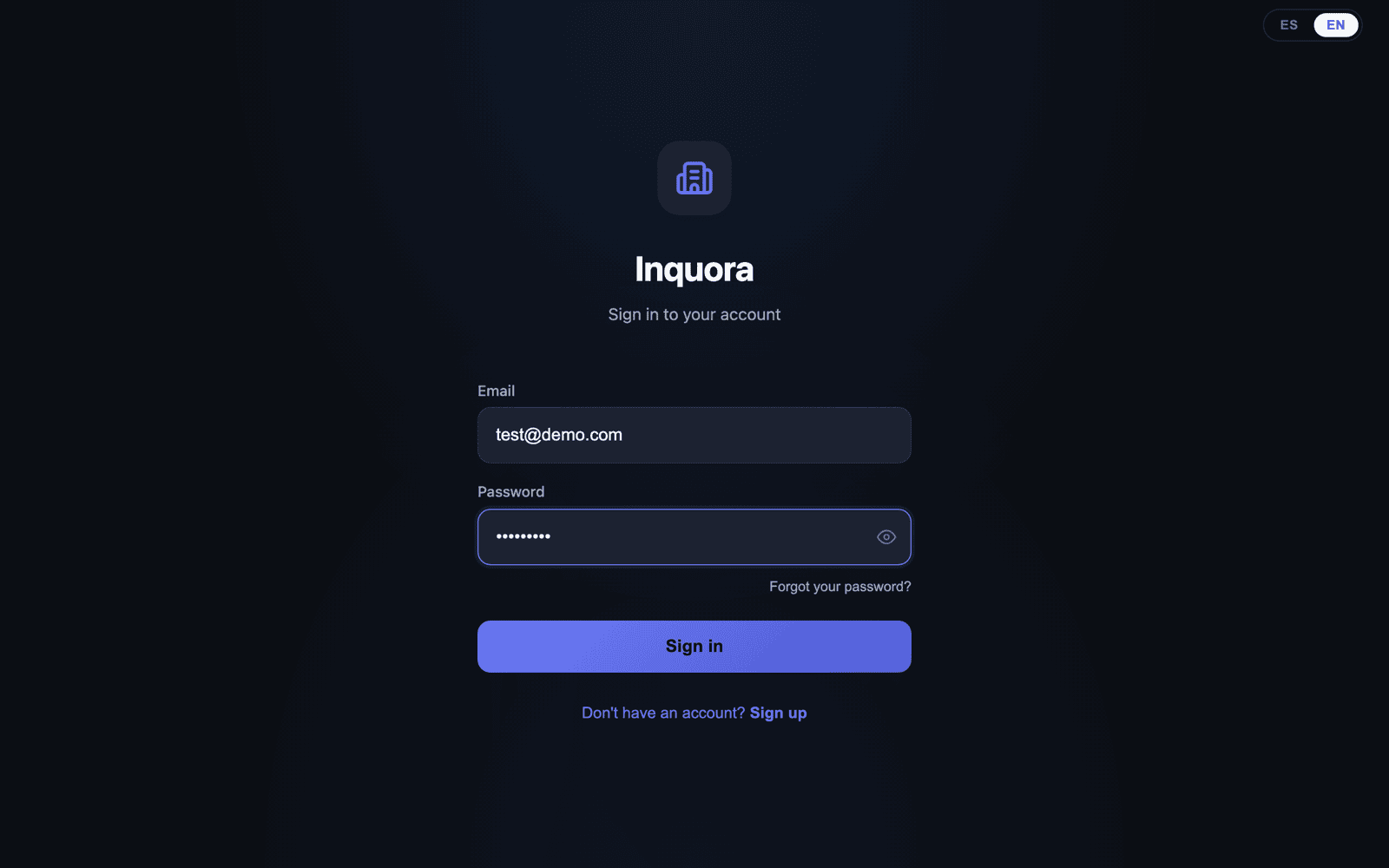
- 1Open Inquora and create your account with your email and a password.
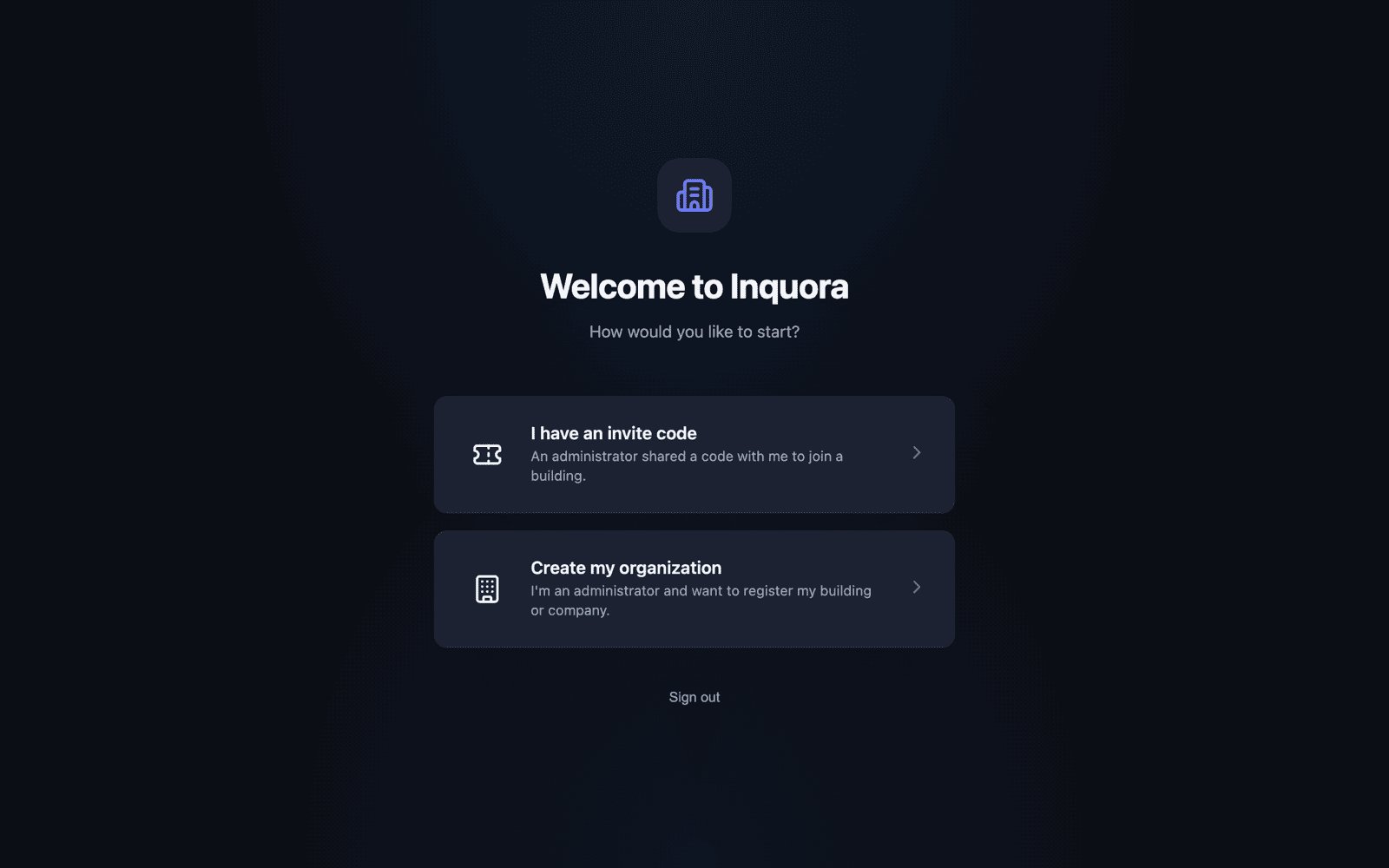
- 2The first time you sign in you'll see the welcome screen with two paths.
- 3Choose Create my organization (the other path, “I have an invite code”, is for residents).
- 4Enter your organization name (your management company or board), the building name and its address.
- 5Tap Create organization.
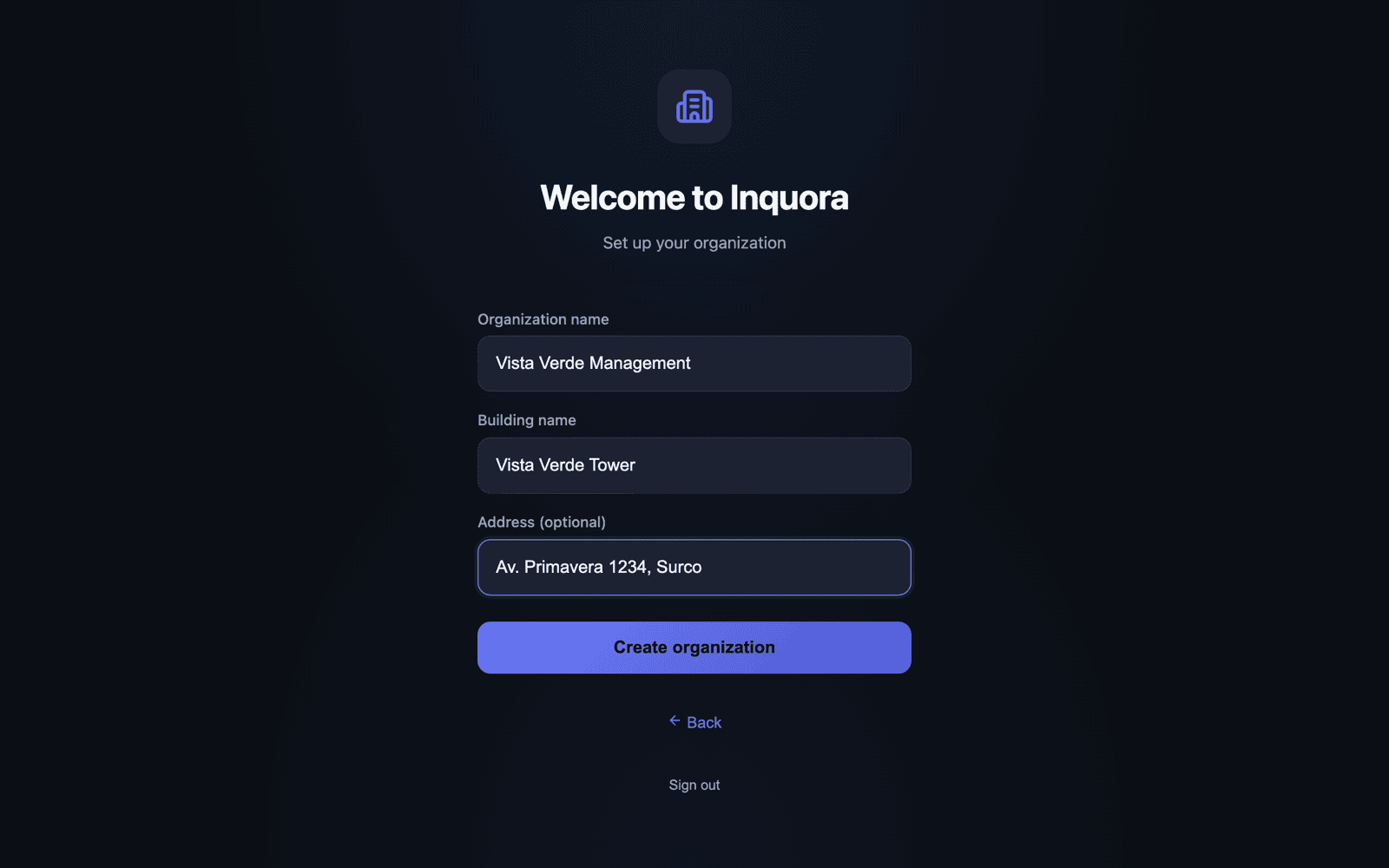
The first user who creates the organization becomes the manager with full permissions. You can invite residents, security staff and other managers afterwards.
The setup wizard leaves your building ready
As soon as you create the organization, Inquora opens a step-by-step wizard that leaves your building configured and ready to charge. You can't skip it — that's precisely what prevents starting with an empty system you don't know how to use.
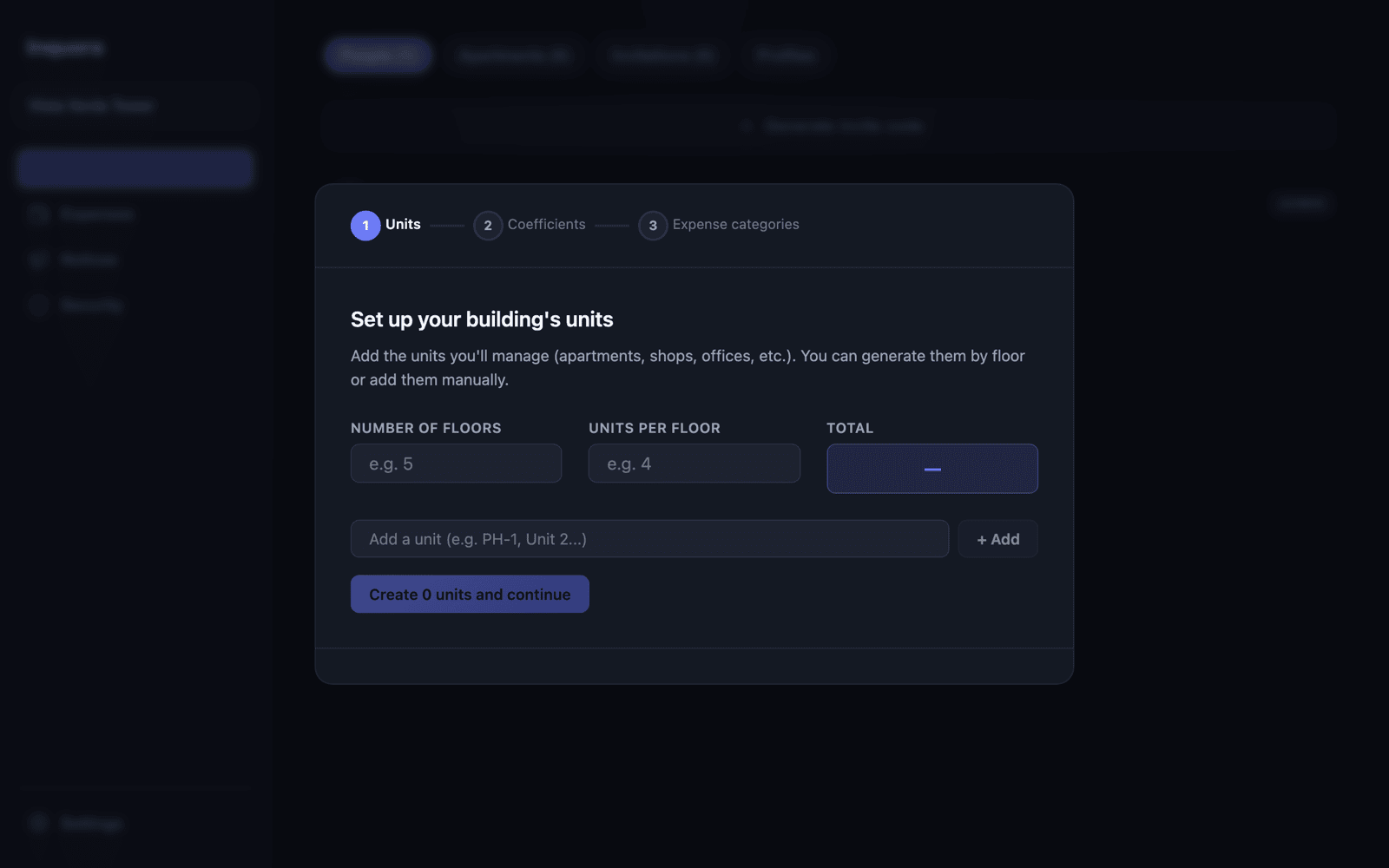
- 1Step 1 — Units. Enter how many floors the building has and how many units there are per floor; the wizard generates them for you (101, 102… 504). You can also add them one by one if your numbering is unusual.
- 2Step 2 — Coefficients. Assign each unit's share. If they're all equal, tap Distribute evenly and you're done.
- 3Step 3 — Expense categories. Set up the categories you'll charge every month (power, water, cleaning, security…).
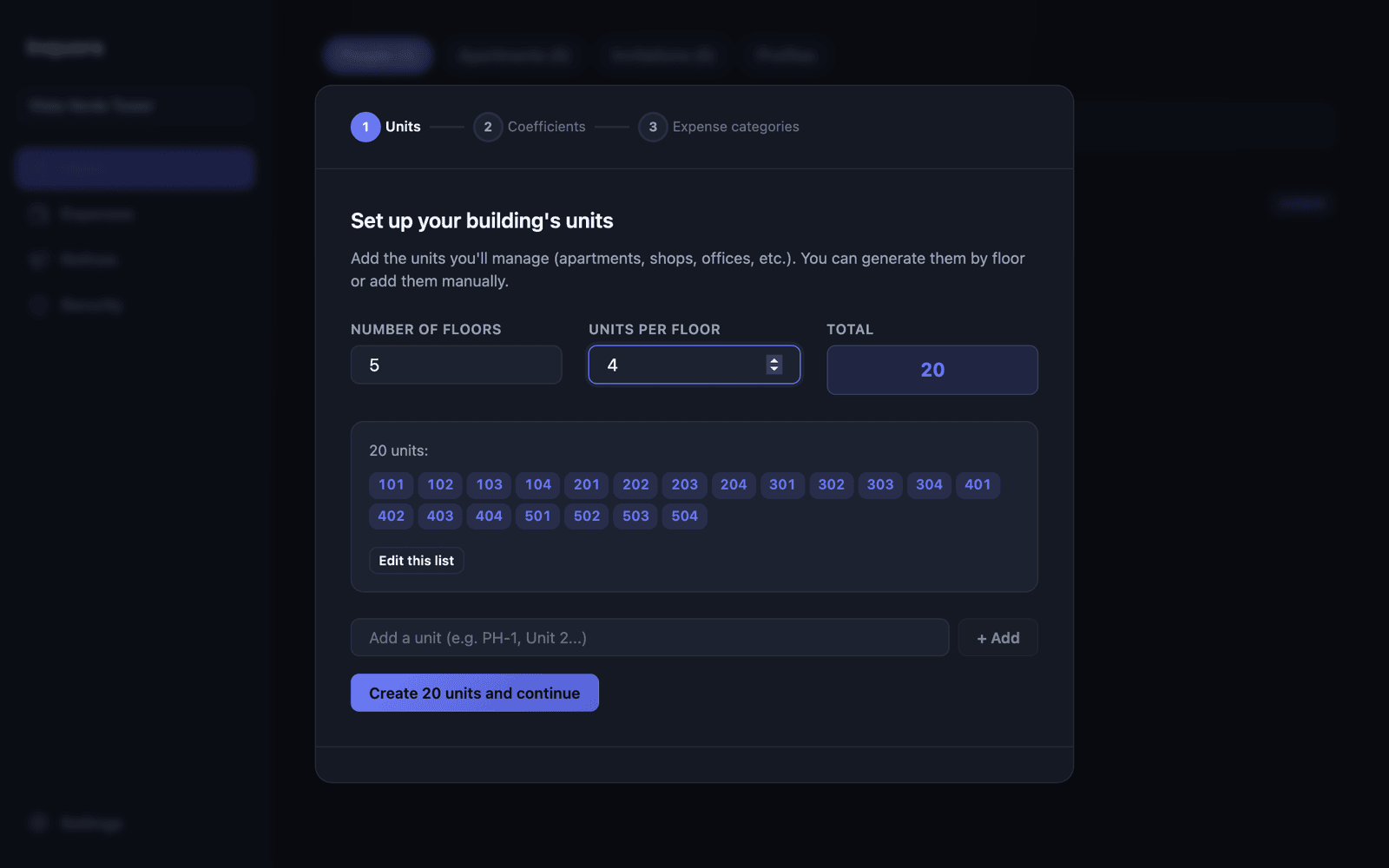
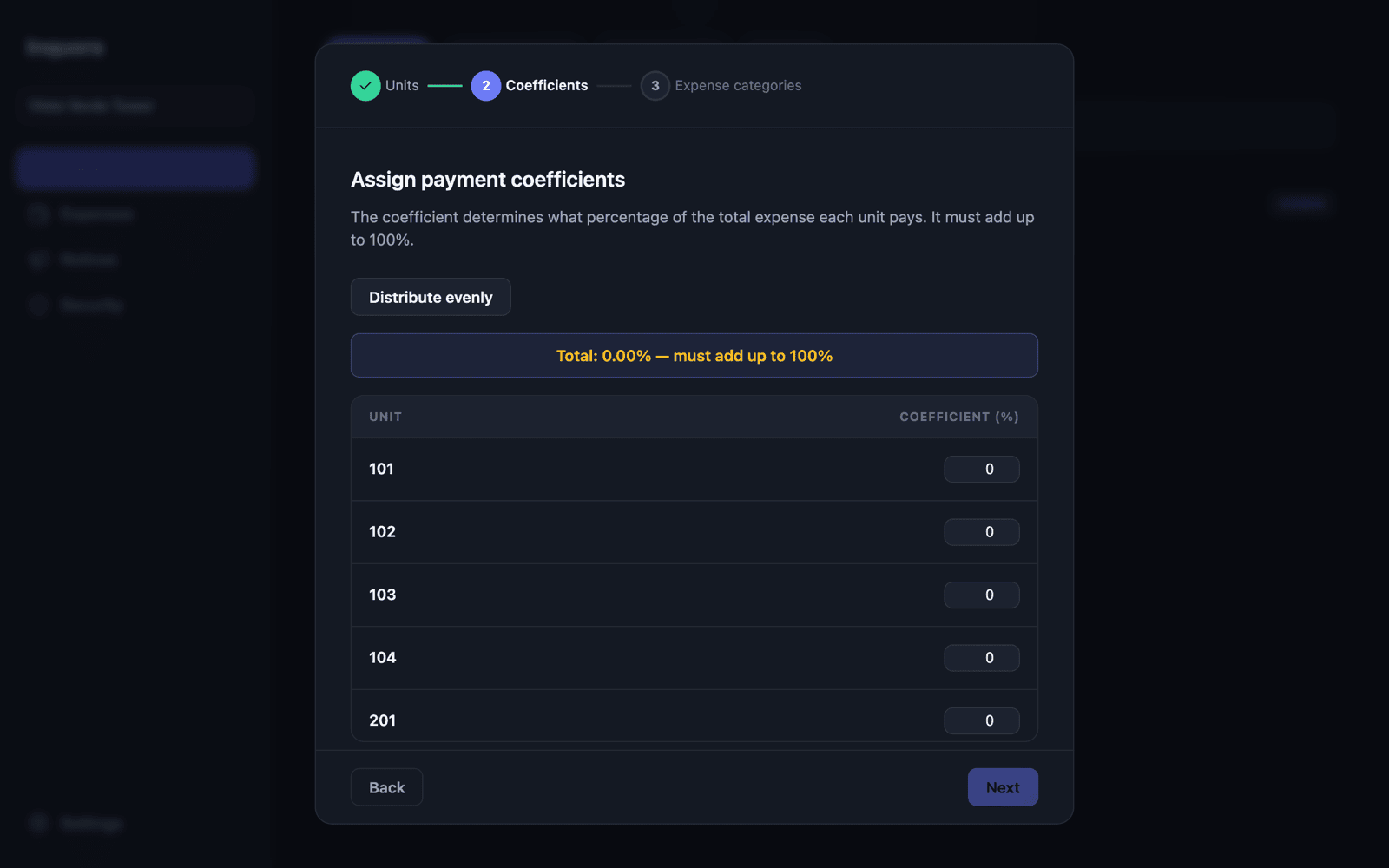
Prefer to fine-tune the percentages later? Finish the wizard with an even split and adjust once you have the floor areas at hand.
Loading your units
Under Users → Apartments you see every unit, its share and its status. The key control is always on top: Total share, which must add up to 100%.
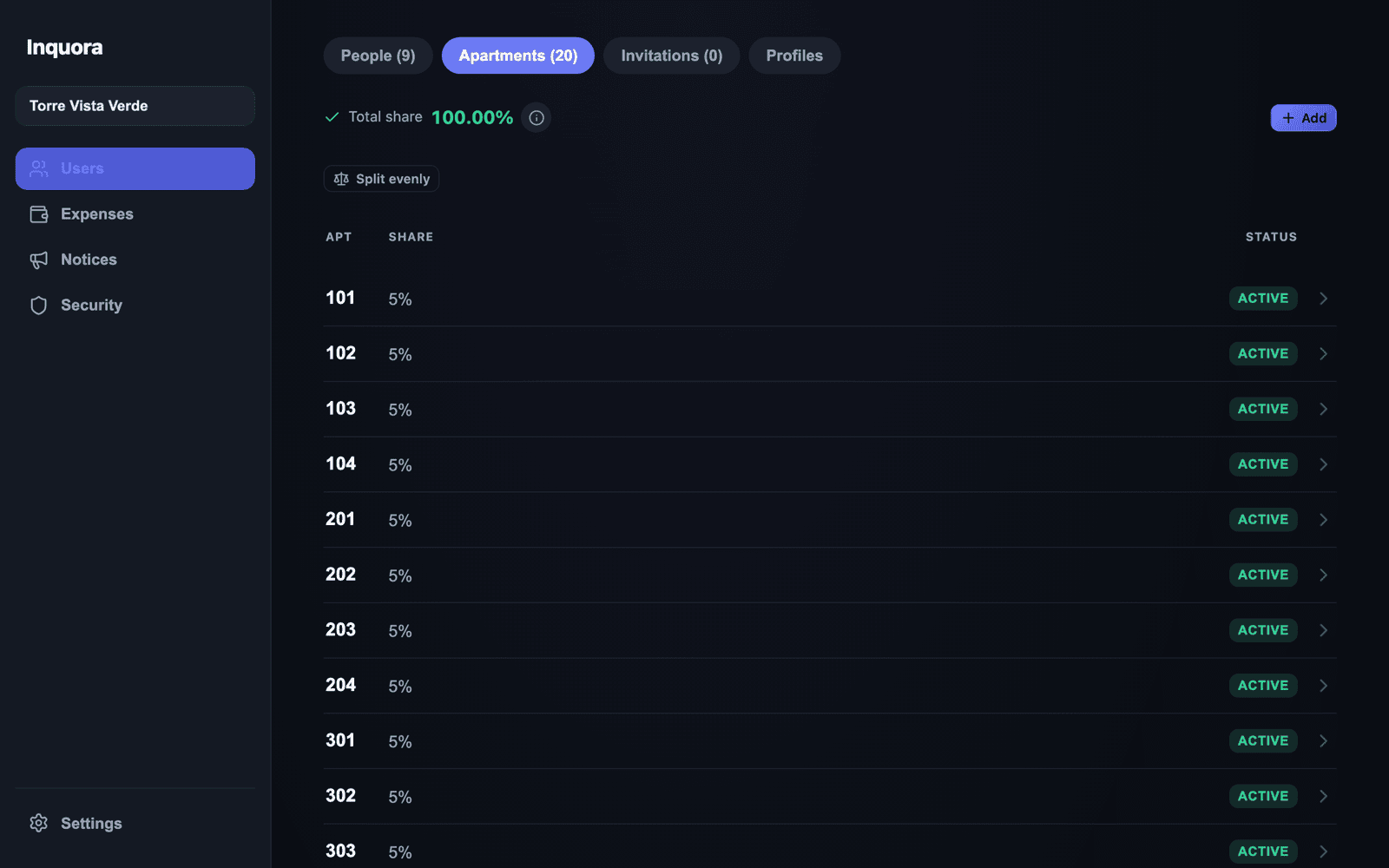
To add units tap Add. There are three ways, depending on your building:
| Method | When to use it |
|---|---|
| One | Add a single unit |
| Generate | Create many at once by floors (101, 102… 504), with an optional prefix |
| Paste list | Paste your list exactly as you have it (from Excel, for example) |
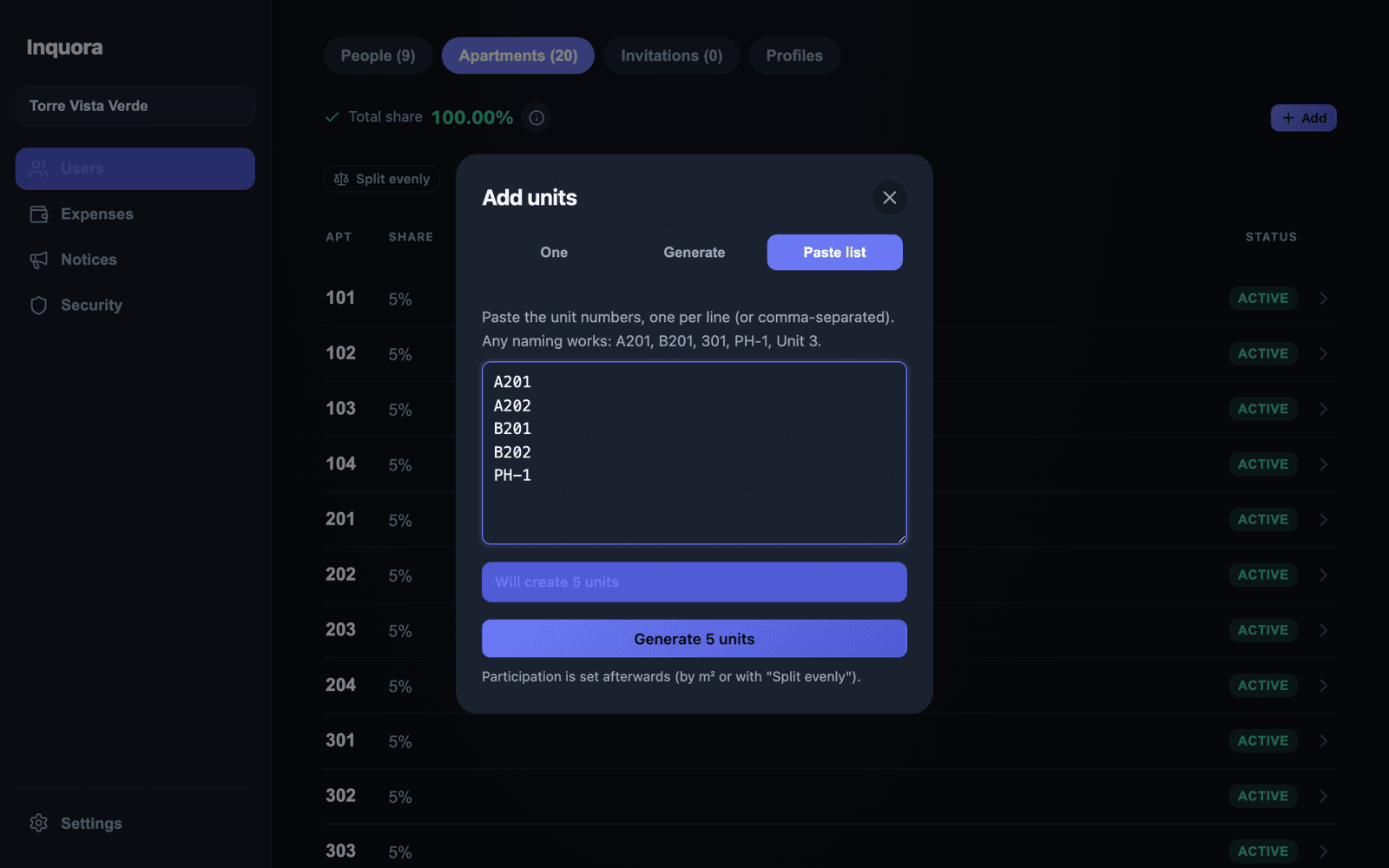
Paste list is the escape hatch for every odd case: towers A and B, penthouses, shops, parking spots. Paste one unit per line and the system tells you how many it will create, which already exist and which are duplicated.
Participation (%) and floor area
Participation sets how much each unit pays of the shared expenses. It's the heart of the calculation, which is why Inquora gives you three ways to define it.
- ·Split evenly. One button spreads 100% across all units. Ideal when every unit is similar.
- ·By floor area. Enter each unit's area (m²) and the system computes the proportional percentage. This is the most common case in buildings with different unit sizes.
- ·Manual. Type each unit's exact percentage, for instance when your bylaws already fix it.
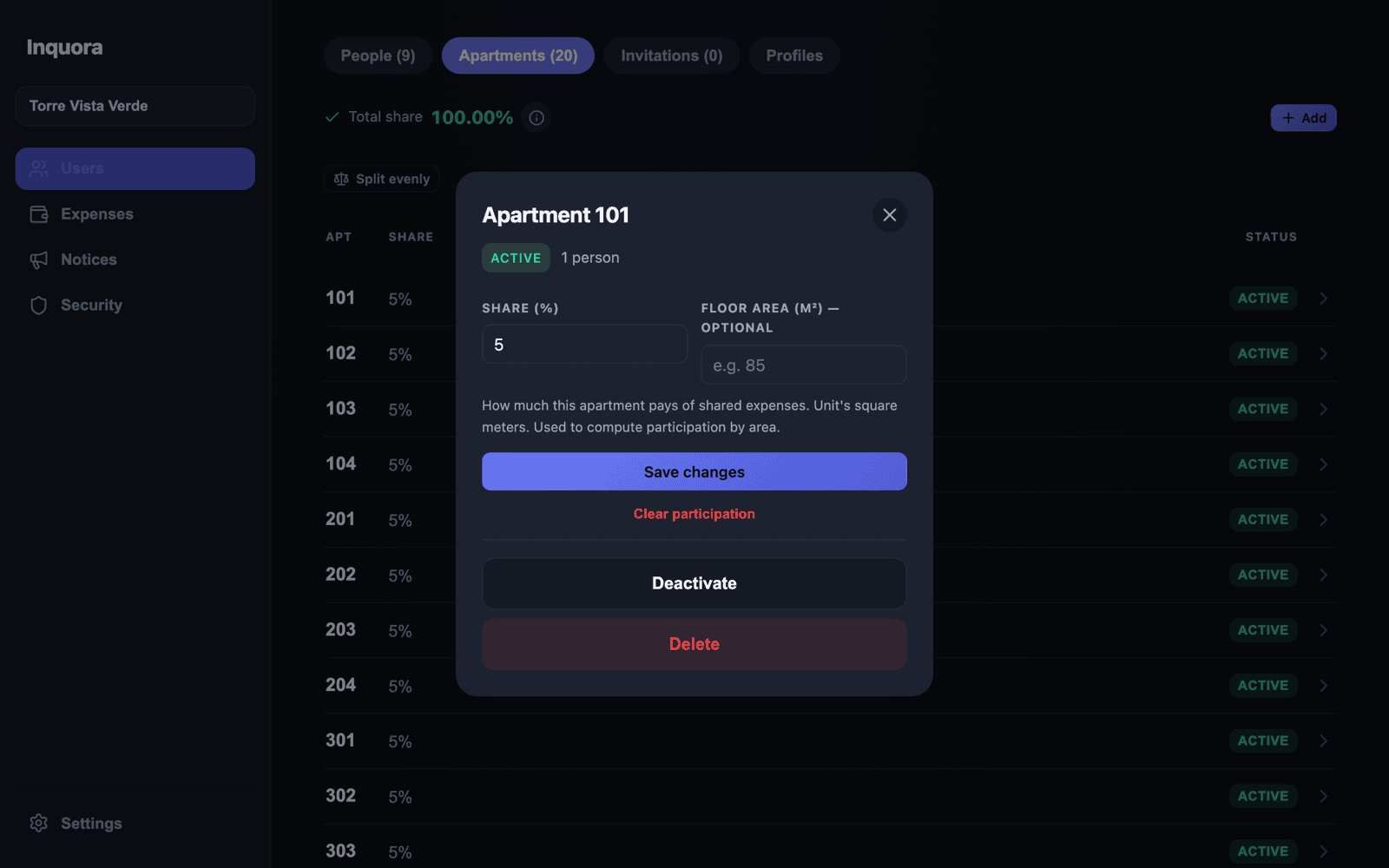
- 1Tap any unit in the list to open its detail.
- 2Enter its Share (%) and, optionally, its Floor area (m²).
- 3Tap Save changes.
- 4If you entered m² for every unit, use Distribute by m² in the list and the system computes the percentages for you.
Total share across all active units must be 100%. If it isn't, Inquora warns you in amber: until it adds up, the fees won't reflect the month's real total.
Floor area is optional. If you skip it nothing breaks: you can work with percentages only, or with an even split.
Recording the month's expenses
This is your monthly routine, and the part that saves you the most time. Under Expenses → Items you enter what the building cost this month; the system does the split.
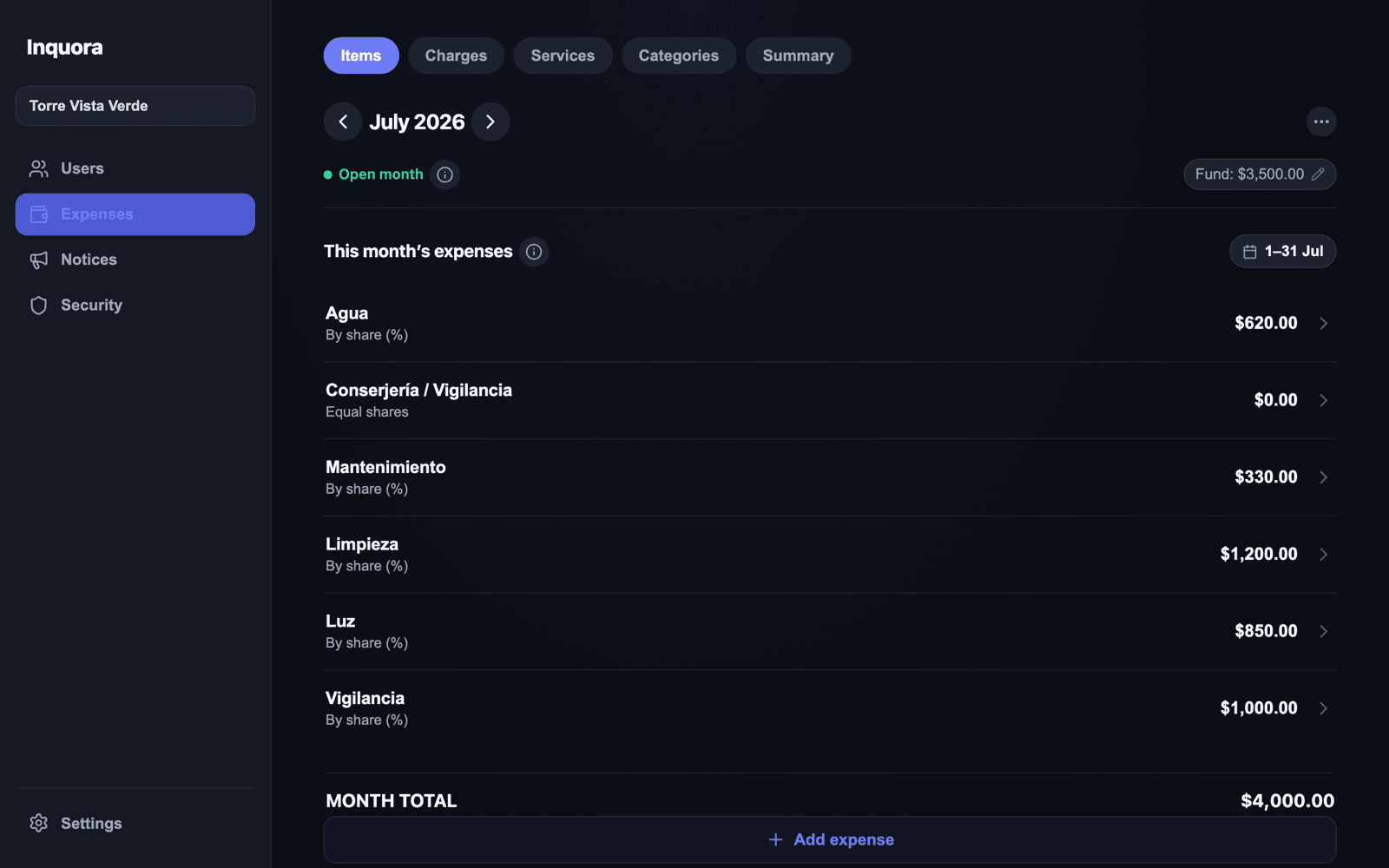
- 1Check you're on the right month (top, with the arrows).
- 2Tap Add expense.
- 3Type the expense name (for example, “Elevator (maintenance)”).
- 4Choose how it splits: By share (%) or Equal shares. If the building's fund pays for it, choose Current balance and pick which fund it comes from.
- 5Enter the amount and tap Add.
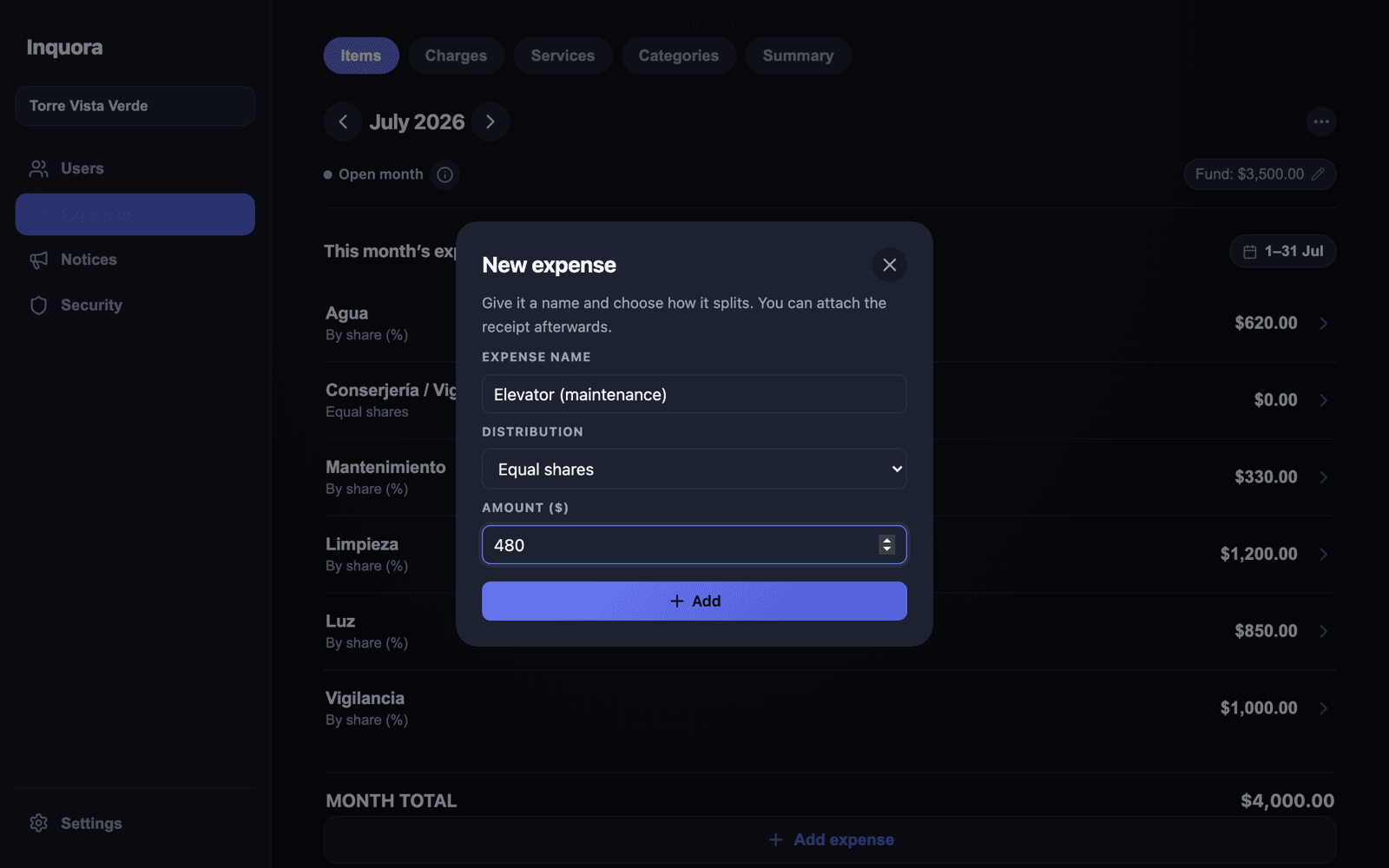
Amounts save on their own, instantly. You can enter one expense after another without waiting: the calculation runs in the background while you keep typing.
Each expense splits one of two ways depending on its nature: by share (general services, paid according to each unit's size) or in equal parts (things everyone uses the same, like security staff).
Extraordinary expenses and levies
An extraordinary expense is what doesn't repeat every month: painting the facade, replacing the water pump, fixing the elevator. It has its own button — Extraordinary expense — so it never gets mixed with running costs.
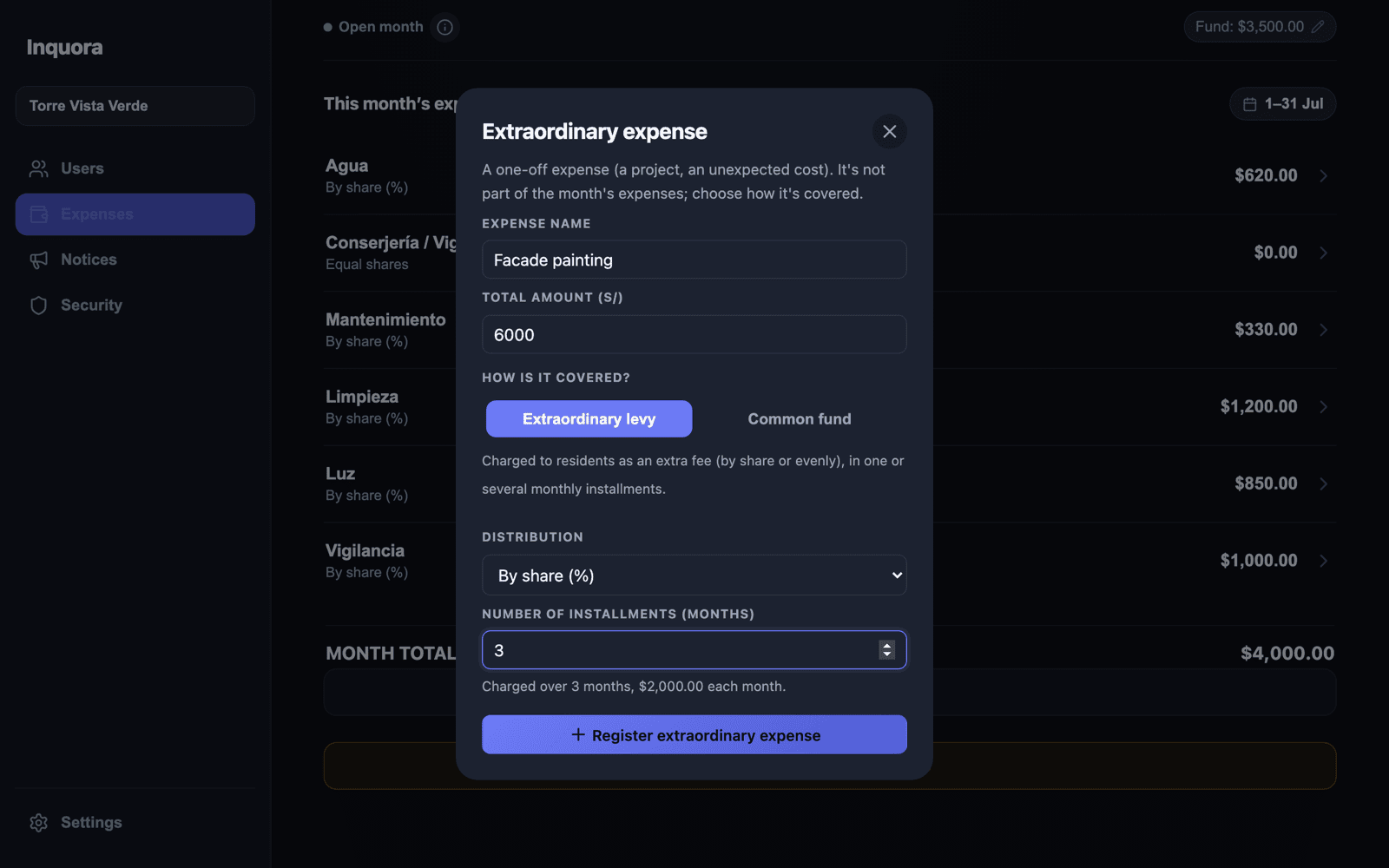
When you record it you choose how it's covered:
| Option | What it means |
|---|---|
| Extraordinary levy | Charged to residents as an extra fee on top of the monthly one. It can be split across several months |
| Common fund | Paid by the building's fund (operating or reserve). Residents are charged nothing |
- 1Under Expenses → Items, tap Extraordinary expense.
- 2Enter the name and the total amount of the project.
- 3Choose Extraordinary levy (charged) or Common fund (the fund pays).
- 4For a levy, set how it splits and in how many installments it will be charged.
- 5Tap Register extraordinary expense.
If you choose 3 installments for a $6,000 project, Inquora automatically creates $2,000 in each of the next three months, labelled “installment 1 of 3”, “2 of 3” and “3 of 3”. The resident sees it separated from their normal fee.
Charges: who paid and who didn't
Under Expenses → Charges you get the full picture of the month's collections: how much should be collected, how much came in, and each unit's status.
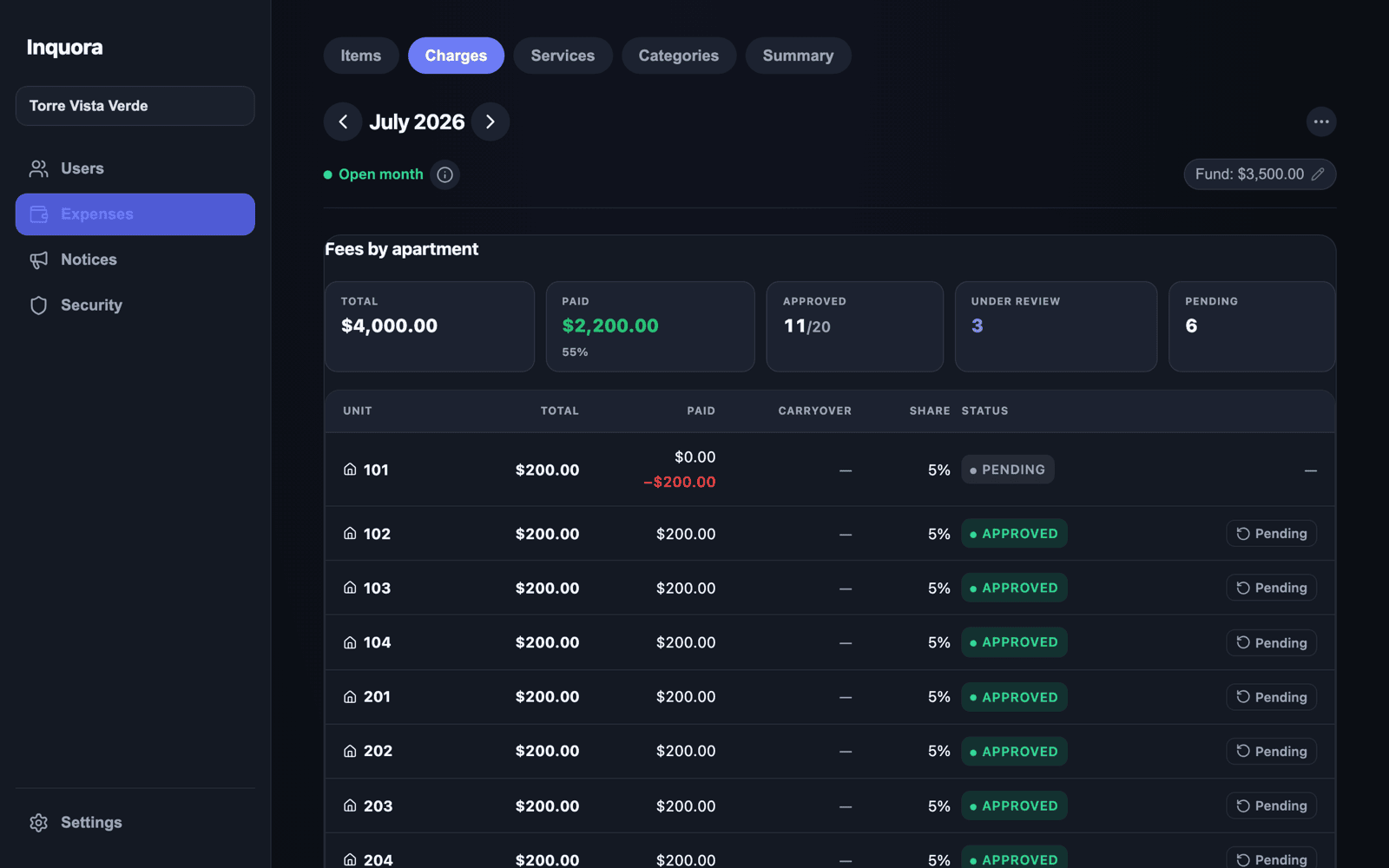
- ·Total — what the month's collections add up to.
- ·Paid — how much actually came in, and what percentage that is.
- ·Approved / In review / Pending — how many units are in each state.
Below, every unit with its fee, what was paid, the carryover from last month, its share and its status. When a resident declares a payment, Approve and Reject appear right in their row.
Carryover is the balance coming from last month: overpayments are credited, shortfalls are added. You don't have to track that on the side.
Operating fund and reserve fund
Many buildings keep a common fund for unexpected costs, and some also set aside a reserve fund for major works. Inquora supports both, separately.
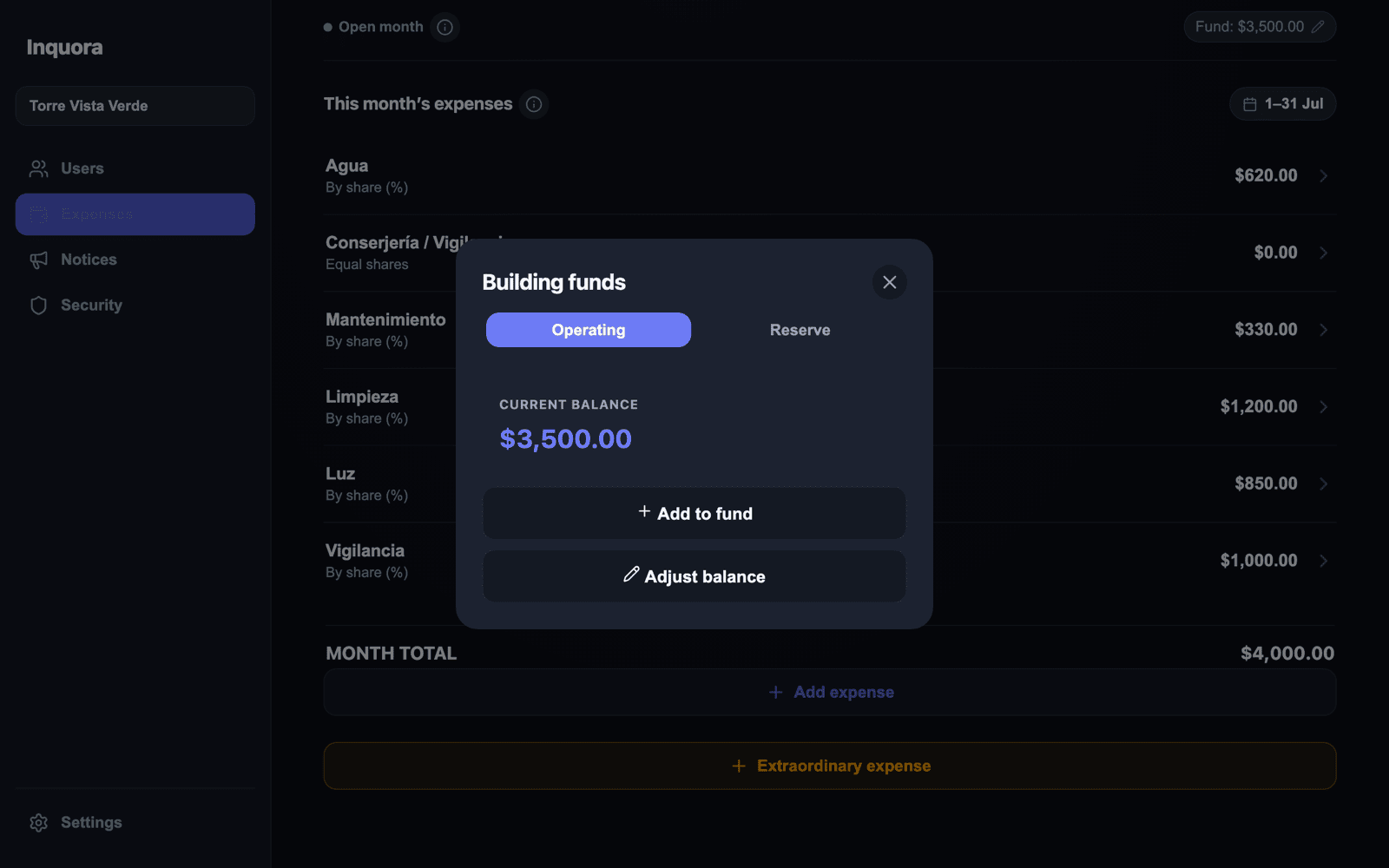
- 1Under Expenses → Items, tap the Fund chip (top right).
- 2Pick the Operating or Reserve tab.
- 3Use Add to fund to record a contribution, or Adjust balance to correct the balance.
When you record an expense paid From the fund, you choose which fund it comes out of and the balance is deducted automatically. Every movement is logged and residents can see it.
If your building doesn't run a fund, simply don't use it: nothing in the system requires one.
Notices for residents
Notices replace the WhatsApp group for what matters: water cuts, meetings, fee reminders. You publish once and every resident sees it in their app.
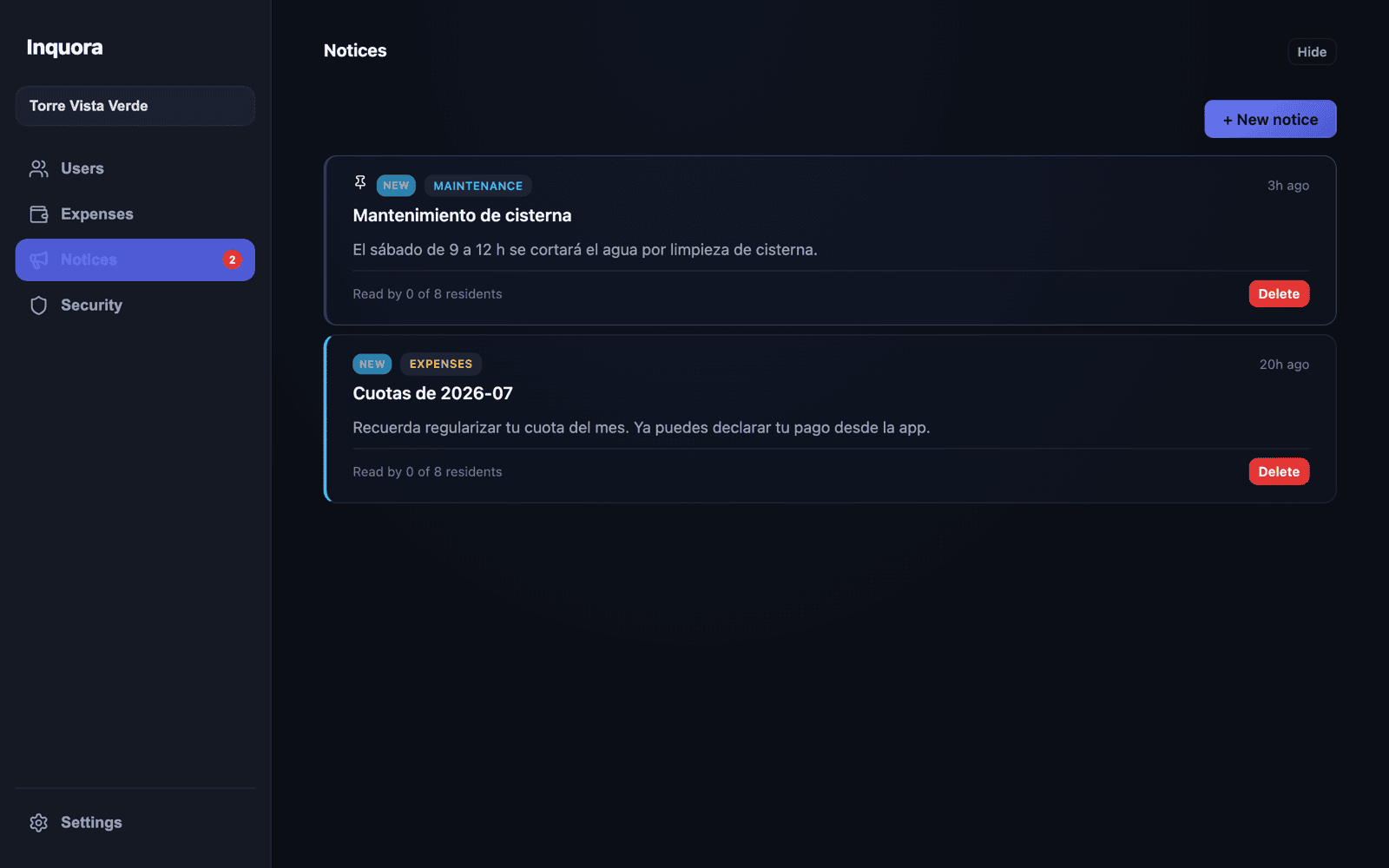
- 1Go to Notices and tap New notice.
- 2Write the title and the message, and pick a category (general, maintenance, expenses).
- 3Publish it. It shows up immediately on every resident's home screen.
Notices are featured for 24 hours and then move to history, so the resident's screen always shows what's current.
The resident's app
Here's the other half of the system — the half that brings complaints down. Residents open it on their phone and see, without having to ask anyone, what they owe, why, and where the building's money is going.
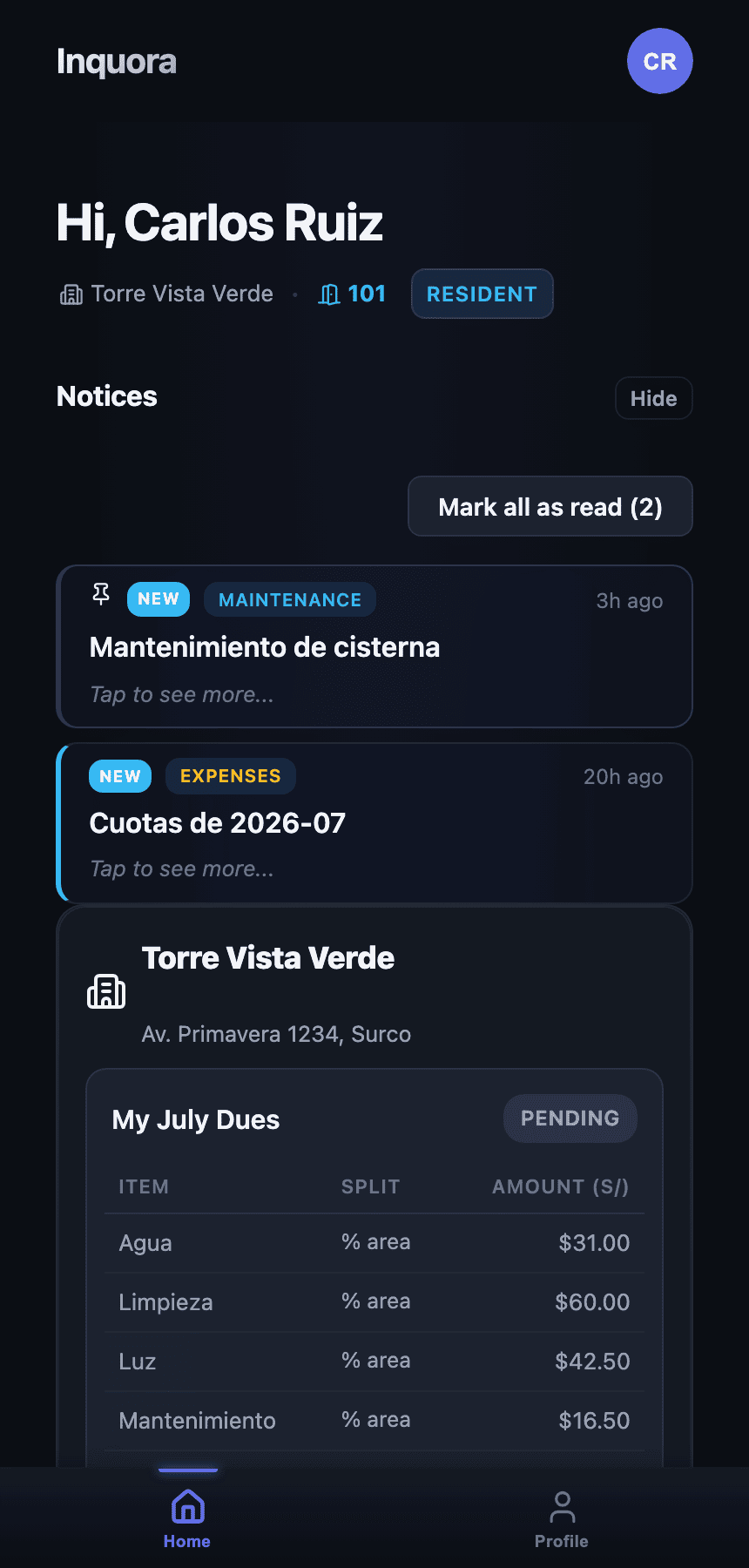
- ·Their fee for the month, broken down concept by concept (power, water, cleaning…) and how much of each is theirs.
- ·Their status: pending, in review or paid.
- ·The building's notices.
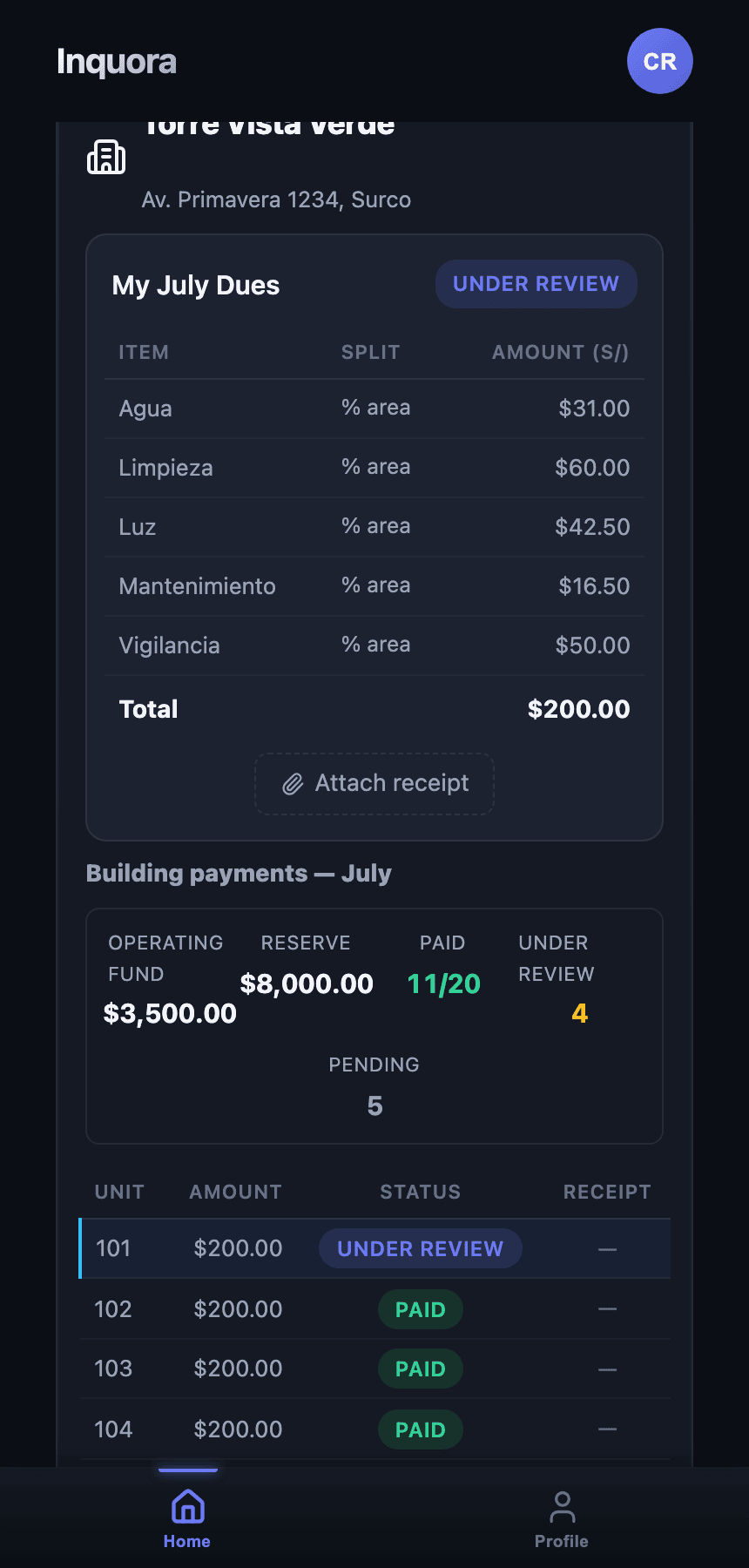
- ·The whole building's collections: how many paid and how many didn't.
- ·Fund movements, both common and reserve.
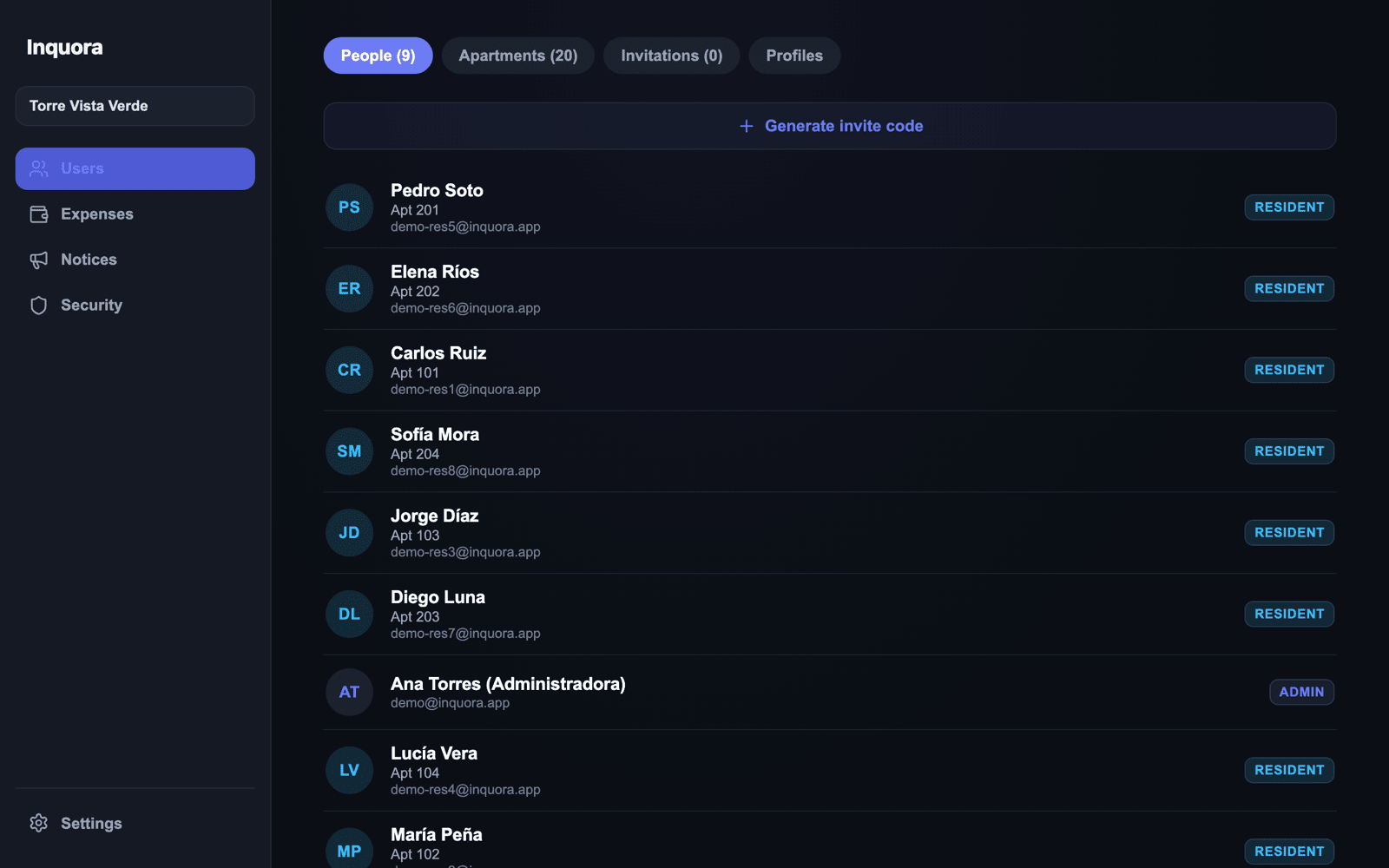
Residents join with an invite code you generate under Users → Generate invite code. They don't have to configure anything.
The resident declares, you approve
This is the full loop, and it shows how what one side does shows up on the other immediately.
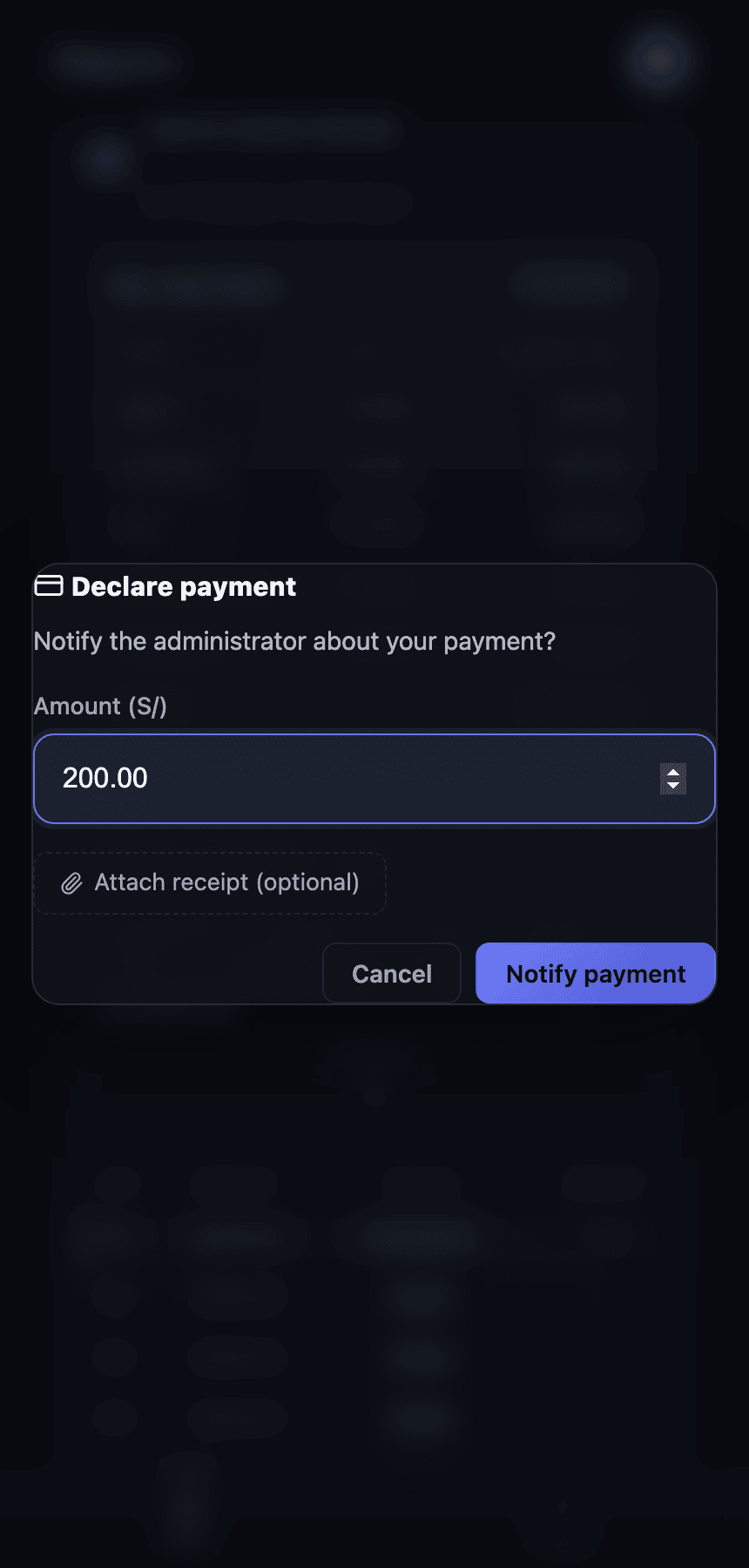
- 1The resident sees their fee as Pending and taps Declare payment.
- 2They confirm the amount and, if they want, attach the transfer receipt.
- 3Their fee moves to In review: they've told you they paid.
- 4You see it under Expenses → Charges, with Approve and Reject in their row.
- 5You tap Approve and the fee becomes Paid, for both of you.
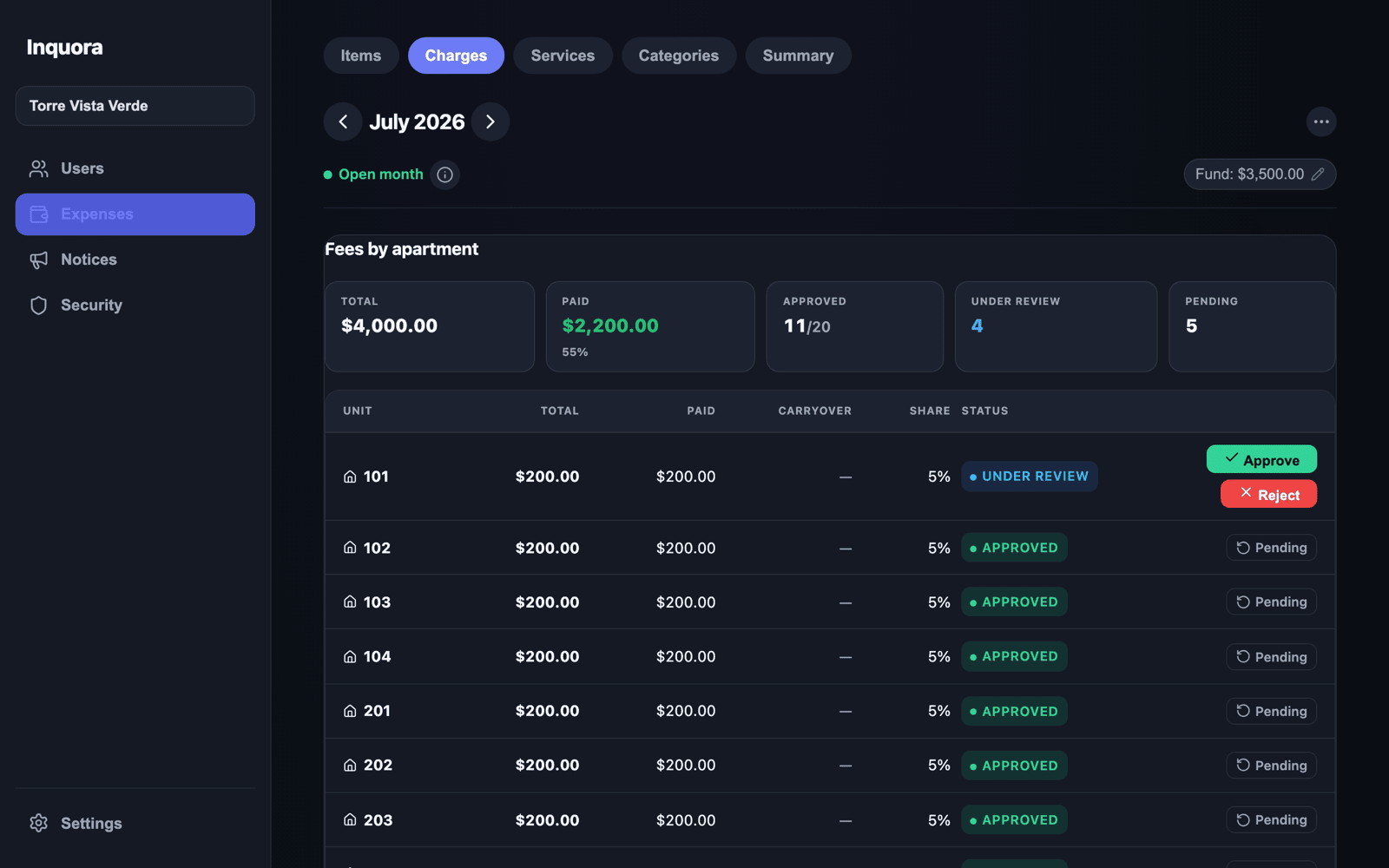
If the payment doesn't check out, tap Reject and leave the reason; the resident sees it and can correct.
Transparency: residents see where the money goes
Most conflicts in a building come from the same root: nobody knows where the money went. Inquora fixes that by showing residents the same thing you see, without them having to ask.
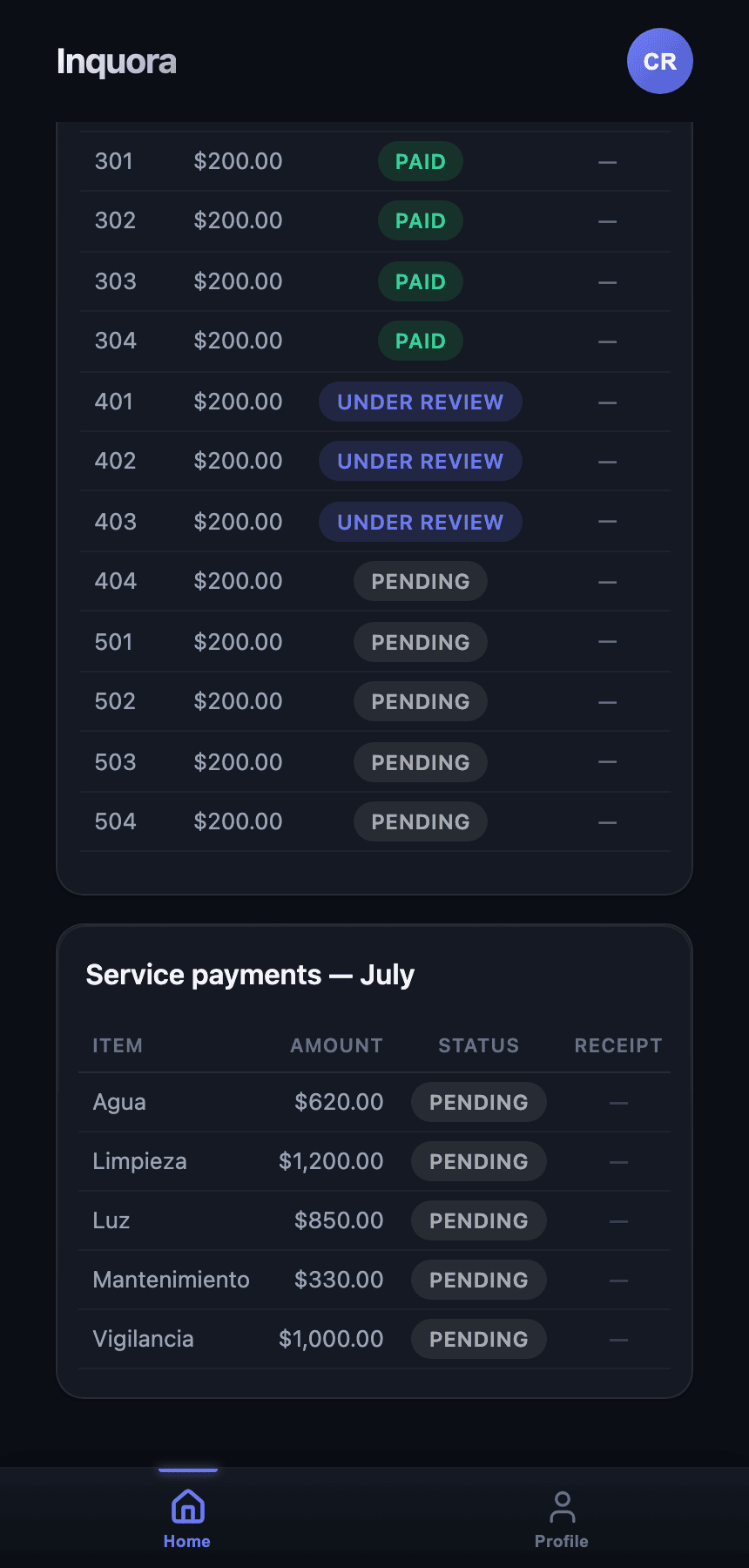
- ·What each service cost this month (water, power, cleaning…), with its amount.
- ·Who paid and who didn't across the building, unit by unit.
- ·The funds: operating and reserve balances.
- ·Fund movements: what was paid with shared money and what's left.
- ·Extraordinary expenses, kept separate from their regular fee so they never get confused.
This isn't a bonus feature: it's the pitch to the board. When owners can see the accounts on their phone, meetings stop being an interrogation of the manager.
Phone and computer
Inquora adapts to the screen you work from, without making you learn two different systems.
| Role | Where they work | What they get |
|---|---|---|
| Manager | Computer and phone | On a computer, a side panel with every section and full tables. On a phone, the same information with thumb-friendly navigation |
| Resident | Phone | Their fee, their payments and the notices, always at hand |
| Security staff | Phone | Parcels, patrols and access logging |
Same account, same information everywhere: what you enter on the computer shows up on the phone instantly.
Security: parcels, patrols and attendance
If your building has security staff, Inquora includes the Security module so the shift is logged and doesn't depend on a paper notebook.
- ·Parcels — log a parcel's arrival and mark when it was handed over, tied to the right unit.
- ·Checklist / patrols — shift tasks with configurable templates (daily, weekly, monthly) and their completion.
- ·Attendance — staff check-in with location validation.
- ·Access log and incident reports.
Residents see their pending parcels on their own screen, so they stop asking at the front desk.
Your data and privacy
Your building's information is yours and it's protected by design.
- ·Everyone sees only what's theirs. A resident sees their fee and the building's general information; never other people's personal data.
- ·Role-based permissions. Manager, resident and security staff have different access, and you decide who is who.
- ·Cloud data, with backups. The history doesn't live on one person's laptop: if the manager changes, the information stays.
- ·We ask for the minimum data possible. No more than what running the building requires.
See the privacy policy and terms on the site for the full legal detail.
Frequently asked questions
Do I have to move my whole spreadsheet in? No. You load the units (you can paste the list straight from Excel) and start with the current month. Old history can stay where it is.
What if my units have unusual numbering? None is unusual for Inquora: A201, PH-1, Shop 3, Parking 12. Load them exactly as they are, even mixed.
Can I manage more than one building? Yes, from the same account, switching buildings with a selector.
Do residents pay to use the app? No. The management company or board contracts the service; residents use the app at no cost.
Does the app collect the payments? We don't process payments: residents pay the way they always have (transfer, deposit) and declare it in the app for you to approve. You keep your collection method.
What if I get an amount wrong? Edit it and the system recalculates everything on its own. While the month is open, everything is correctable.
Do I need to install anything? Managers can work straight from their computer's browser. Residents use the app on their phone.
What happens if the manager changes? The information belongs to the organization, not the person. The new manager signs in and finds the whole history.
Support and contact
Want to see Inquora running with your building's data, or have a question before deciding? Write to us and we'll answer personally.
For privacy matters or your data: legal@delportaltechnologies.com.
Want to see it with your building's data?
Write to us and we'll show you Inquora running on your case — how many units you have and how you collect today.